
Shpock: Buy & Sell Marketplace
ShpockShopping
2.8612.00 Reviews
- Version
- 9.20.7
- Installs
- 10.00M
- Age Rating
- Teen
Screenshots

Our Review of Shpock: Buy & Sell Marketplace
 Analysis by Appyee
When I want to sell something I no longer use, I’d rather find a nearby buyer than spend time packing a parcel. That local-first approach is what makes Shpock: Buy & Sell Marketplace appealing: it gives everyday items a place to change hands, from clothes and home goods to electronics. I find it most useful when I’m willing to browse, ask a few questions, and arrange a practical handover instead of expecting a polished retail checkout.
Shpock is a free shopping app from developer Shpock, with optional in-app purchases ranging from $0.49 to $79.99 per item. It has more than 10 million installs and an average rating of 2.9 from around 420,000 ratings, so the overall response is mixed despite its broad reach. It is rated Teen, and version 9.18.7 requires Android 8.0 or later. I’d treat those details as context, not a promise that every local area will have the same selection or experience.
Making Local Buying and Selling Work
My main advice is to think of Shpock less as a shop with guaranteed stock and more as a neighborhood noticeboard that you can search. A useful listing depends on what people nearby happen to be selling, and a successful sale depends on clear communication as much as the app itself. If that sounds manageable, it can be a practical way to find secondhand items or pass on things that are taking up space.
A Simple Routine for Browsing and Listing
For buying, I start with the item I actually need, then narrow the search by category, price, and location. That order helps me avoid getting distracted by attractive but irrelevant listings. I also compare several similar results before messaging anyone: differences in condition, photos, and pickup distance can matter more than a small price gap.
For selling, I take a moment to make the first photo clear and write a description that answers the questions a buyer is likely to ask. Mentioning visible wear, included accessories, and whether collection is practical can save a back-and-forth later. I prefer setting a price I can explain rather than relying on a vague “make an offer”; negotiation is easier when both sides know what is included.
Settings and Checks That Matter
Location is central to the experience, so I check that the search area suits how far I’m actually willing to travel. A broad radius can surface more choice, but it can also make a tempting bargain unrealistic once travel time is considered. For bulky furniture or fragile items, I would keep the search close enough that collection remains straightforward.
Before arranging a deal, I look at the seller’s profile and any available feedback, then ask focused questions about condition and collection. Ratings can offer useful context, but I don’t treat them as a guarantee. I also read the current in-app guidance on payments and meetups rather than assuming every transaction follows the same process. For an in-person exchange, a public, sensible meeting point and a clear plan are basic precautions, not optional extras.
Small Habits That Save Time
When I’m hunting for a particular item, I keep the search narrow and revisit it instead of scrolling aimlessly through every category. If a listing looks promising, I message with one concise note covering availability, condition, and a realistic time to collect. That gives the seller something concrete to answer and helps me avoid a long negotiation before I know whether the item is suitable.
Sellers can make their own routine more efficient by preparing photos and item details before creating a listing. I’d photograph the item in decent light, include any flaws, and keep the description factual. If an item does not attract serious interest, I would first review the photo, wording, price, and collection terms rather than repeatedly reposting the same unclear offer. A small improvement to the listing can reduce unnecessary messages.
Where the Experience Has Limits
Local marketplaces are naturally uneven. One neighborhood may have a useful run of listings, while another may offer little for a particular search. Shpock is not my first choice when I need a specific product immediately, want a standardized return process, or need delivery to be the central part of the purchase. A conventional retailer is more predictable for those needs; a shipping-focused resale service may suit buyers who cannot collect locally.
There is also the ordinary uncertainty of buying from individuals: descriptions can leave questions unanswered, messages may take time, and agreeing on a meetup takes coordination. The app can help people find and contact each other, but it cannot make every listing accurate or every transaction convenient. I avoid paying or travelling until the item, price, and handover plan are clear, and I walk away if the conversation feels pressured or inconsistent.
Who Is Likely to Get the Most From It?
I’d recommend trying Shpock if you enjoy secondhand shopping, can collect nearby, and have patience to compare listings. It can be especially handy for household items that are awkward to ship, or for selling usable belongings to someone who can pick them up. A realistic everyday example: I’m clearing a shelf before reorganizing a room, list a small appliance with honest photos, answer a couple of questions, then agree on a convenient collection time. That is a more natural fit for the app than expecting an instant sale.
On the other hand, I’d skip it for urgent purchases, high-stakes transactions that require formal guarantees, or items where authenticity and after-sales support are crucial. If I were buying a costly electronic device, I’d want to inspect it carefully and verify that it works before handing over money; if that is not possible, I’d choose a seller or retailer with protections better suited to the purchase. The convenience of a nearby listing does not remove the need to judge the risk.
My Take After Using It
Shpock’s strongest idea is simple: make it easier to connect local buyers and sellers without turning every used item into a shipping project. In practice, the app rewards people who search with a clear goal, write useful listings, and make sensible arrangements. It is less compelling if you expect every search to produce a perfect match or want a fully managed shopping experience.
With more than 600 reviews alongside its large rating pool, the overall average is a reminder to keep expectations balanced rather than assume a uniformly smooth experience. I’d try it for low-pressure browsing or a straightforward local sale, while checking current terms and transaction guidance before using any payment option. If your priorities are local choice and reuse, it is worth a look; if certainty, delivery, or formal support comes first, another route will probably suit you better.
What Is Shpock?
Alright, let’s dive right in. Shpock stands for “Shop in your Pocket,” and it’s essentially a marketplace app that allows you to buy and sell goods locally. Think of it like a virtual flea market where you can find everything from vintage clothing to electronics. The app is available on both Android and iOS, making it super accessible for nearly everyone.
Setting Up and Getting Started
Getting started with Shpock is a breeze. Once you download and install the app, you’ll need to sign up, which you can do using your email, Facebook, or Google account. I love that they give you multiple options because it makes the process really flexible.
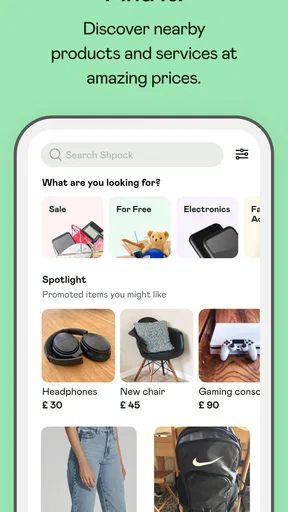
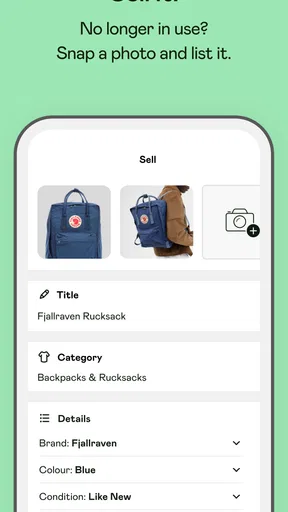
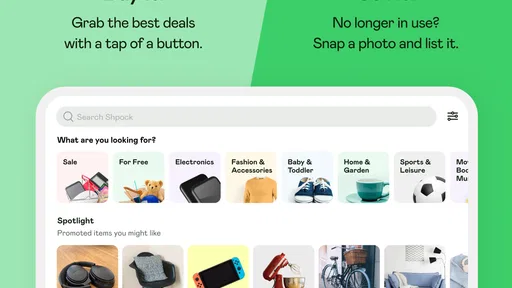
After signing up, you’re greeted with a clean and colorful interface. It’s pretty intuitive, so you won’t feel lost even if you’re not a tech wizard. You can easily navigate through different categories like fashion, home & garden, electronics, and more. Listing your items is as simple as snapping a photo, writing a description, and setting your price. Voila, you’re ready to sell!
Buying on Shpock
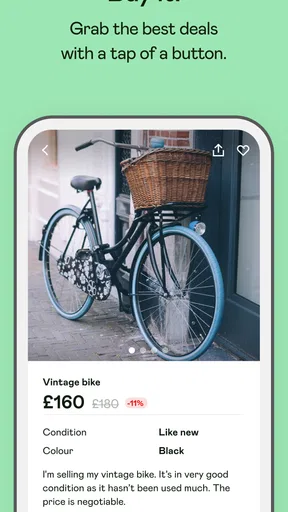
Now, onto the buying experience. Browsing through listings is quite enjoyable, thanks to the app’s user-friendly design. The search function allows you to filter by location, price, and category, which is super handy if you’re hunting for something specific.
I found a sweet deal on a second-hand camera, and the process couldn’t have been smoother. Communicating with the seller was straightforward, and the in-app chat feature made negotiating easy and quick. Once we agreed on a price, we arranged a meetup, and I had my new (to me) camera that same day!
Safety and Security
One thing I appreciate about Shpock is its focus on safety. They’ve integrated several features to ensure secure transactions. User profiles come with ratings and reviews, so you can get a sense of who you’re dealing with. This is especially reassuring when meeting up with strangers.
Moreover, the app has guidelines and safety tips to help keep transactions secure. They encourage users to meet in public places and offer a payment protection service, adding an extra layer of security for online payments.
Community and Support
Shpock also fosters a strong sense of community. The app’s social aspect is pretty cool, allowing users to follow each other and build networks within the app. Plus, the support team is responsive and helpful, which is always a plus in my book.
If you ever run into issues, the app has a comprehensive help section and FAQs that cover most queries. And if you need more assistance, reaching out to their support team is straightforward via the app.
Final Thoughts
All in all, Shpock: Buy & Sell Marketplace has made buying and selling local items not just easy, but fun. The app’s user-friendly interface, coupled with its secure transaction features, makes it a reliable choice for anyone looking to declutter their space or find a bargain.
If you haven’t tried it yet, I’d say go ahead and give it a whirl. Whether you’re a seasoned seller or a curious buyer, Shpock offers a delightful platform for everyone. Happy thrifting!
Verdict
Strengths of Shpock: Buy & Sell Marketplace
- User-friendly interface for easy navigation.
- Quick listing process for selling items.
- Offers buyer and seller protection.
- Localized marketplace for nearby deals.
- Push notifications for instant updates.
Limitations of Shpock: Buy & Sell Marketplace
- Limited payment options available.
- Occasional app crashes reported.
- Some listings lack detailed descriptions.
- Customer support response can be slow.
- Ads can be intrusive for free users.
Similar Picks in This Category
View All
SHEIN-Shopping Online
Roadget Business PTE. LTD.4.8

Amazon Shopping
Amazon Mobile LLC4.4


Mercado Libre: Compras online
Mercado Libre4.8

Wish: Shop and Save
Wish US Holdings LLC4.7

Alibaba.com - B2B marketplace
Alibaba Mobile4.4
Frequently Asked Questions
What is Shpock and how does it work?
Shpock is a mobile marketplace app designed for buying and selling items locally. Users can list items for sale by uploading photos and descriptions, while buyers can browse and make offers. The app facilitates communication between buyers and sellers, making local transactions easy and convenient. It’s a great tool for decluttering and finding unique items.
Is Shpock free to use?
Yes, Shpock is free to download and use. Users can list items for sale and browse listings without any fees. However, there are optional in-app purchases available, such as promotional features to enhance the visibility of your listings. These can help in selling items faster but are not necessary for basic usage.
How secure is buying and selling on Shpock?
Shpock offers several features to ensure a secure marketplace. It includes user profiles with ratings and reviews, which help buyers and sellers assess each other’s credibility. Communication is facilitated through the app to maintain privacy. However, users should take standard precautions, such as meeting in safe locations and verifying payments before handing over items.
What types of items can I sell on Shpock?
Shpock supports a wide range of categories, allowing users to sell almost anything, from fashion and electronics to home goods and vehicles. However, there are guidelines on prohibited items, ensuring that all listings comply with legal standards. Users should review these guidelines to ensure their items are eligible for listing.
How does Shpock handle disputes between buyers and sellers?
Shpock provides a resolution center where users can address disputes. If an issue arises, both parties can communicate through the app to resolve the problem. If needed, Shpock’s support team can be involved to mediate and find a fair solution. It’s important to keep all communication within the app for tracking purposes.
